Claude desktop apps are now installable on macOS and Windows — officially, in beta, as of November 24, 2026. Anthropic announced the feature under the name “Install as app,” letting users convert AI-generated artifacts (charts, webpages, terminals, image editors) into applications with their own icons, dedicated windows, Menu Bar items, and notifications.
The apps run outside the Claude desktop client. They look like native software. They behave like native software, until you try to open them without Wi-Fi. Then they don’t open at all.
“You need to be online and signed in to Claude to open an app,” reads the caveat buried at the bottom of Anthropic’s announcement page. Not just to build them. To launch them. Every time.
That makes them different from every other macOS or Windows app on the market, and from Apple’s own AI-assisted development tools in Xcode 27, which generate locally executable code. Anthropic says these apps can use Claude and its connectors, but “requests the app makes to Claude count toward your plan’s usage limits.” So each click, each notification, each Menu Bar action may burn through your monthly quota.
Users can share apps with others, but permissions are strict: full access is only allowed for apps you built yourself, or, on Team and Enterprise plans, those made by colleagues in your organization. Anthropic explicitly states it “doesn’t review apps before you install them.” So while the feature enables a file manager, a layered image editor, or a terminal emulator, all reportedly built by prompting Claude, the security model rests entirely on user judgment, not platform gatekeeping.
The feature is available across all Claude plans, including free tiers. But AppleInsider calls it “worth avoiding altogether,” noting that “no Wi-Fi and no Claude means you can’t use your AI-generated app, even if you’ve already built and configured it.” That limitation doesn’t just undermine utility, it redefines what counts as a desktop app in 2026.
These aren’t installable binaries. They’re authenticated, stateful web sessions wrapped in native packaging. And they’re rolling out globally, today.
ADFiled by The AI Desk
Models, assistants and the companies and chips behind them, reported from what was released and what was claimed, with the difference kept clear.
More from this desk →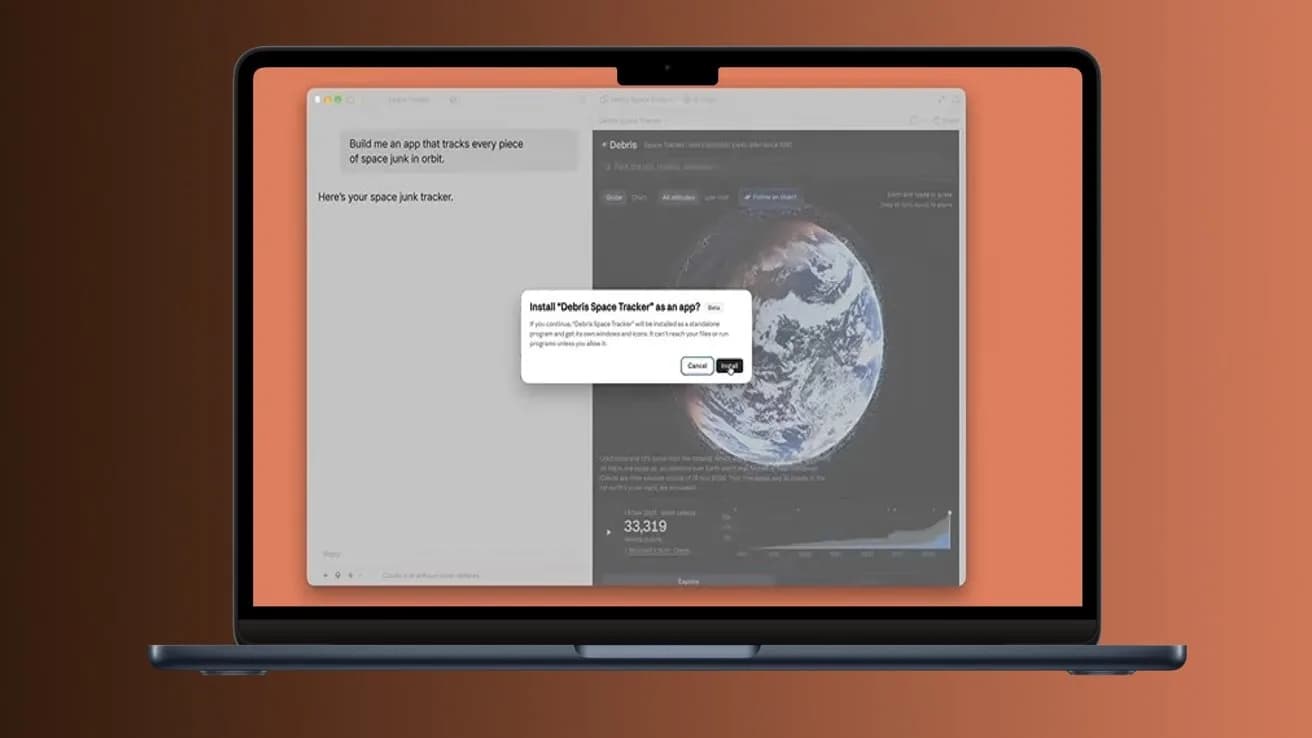

Be the first to comment
Join the argument. No password, just your email or a passkey.