Gemini for Mac now has ‘computer use’ — a new capability that lets the AI click buttons, type text, fill forms, and navigate menus across desktop apps, local files, and websites. It launched today in the U.S., in English only, and only for users running macOS Sequoia or later. The feature does not yet roll out to India.
There is no Indian price, no local availability date, and no mention of Hindi or other Indian language support in the release notes or rollout plan. Google says it’s “rolling out in English in the U.S.”, full stop. No regional expansion plans are disclosed. The Gemini app for Mac remains free and is available at gemini.google/mac.
No subscription, no tiering, no paid upgrade. Just download and go, if you’re in the U.S. And meet the OS requirement. In India? You’ll see the same app, same interface, same chat, but no computer use toggle.
Not yet. Not announced. Not priced. Not scheduled.
Computer use runs in an isolated background window. It doesn’t hijack your cursor or take over your main screen. A live preview appears inside the Gemini chat so you can watch what it’s doing. You choose which apps Gemini can access, no blanket permission.
You pause tasks mid-run. And Gemini asks for explicit approval before performing high-impact actions like sending emails or deleting files. Google lists use cases like “summarising a PDF and pasting the summary into a Slack message”, “comparing prices across three e-commerce sites”, or “updating contact info in your address book from a spreadsheet”.
None of those require a paid plan. None require a new device. All require being in the U.S. Right now. The rollout began at 4:56 a.m. ET today, 10:26 a.m. IST, but that timestamp applies only to U.S. Users.
Indian users opening the app at the same moment saw no change. No toggle. No prompt. No beta opt-in.
Just the existing Gemini interface. Google hasn’t said when, or even if, computer use will land in India. No regulatory filing, no certification listing, no leak, no roadmap. Just silence.
So for now, it’s a U.S.-only feature with hard geographic and language gates. And zero pricing friction: it’s free, built-in, and requires no upgrade. But it also requires you to be where Google says you can be, and right now, that’s only the United States.
ADFiled by The AI Desk
Models, assistants and the companies and chips behind them, reported from what was released and what was claimed, with the difference kept clear.
More from this desk →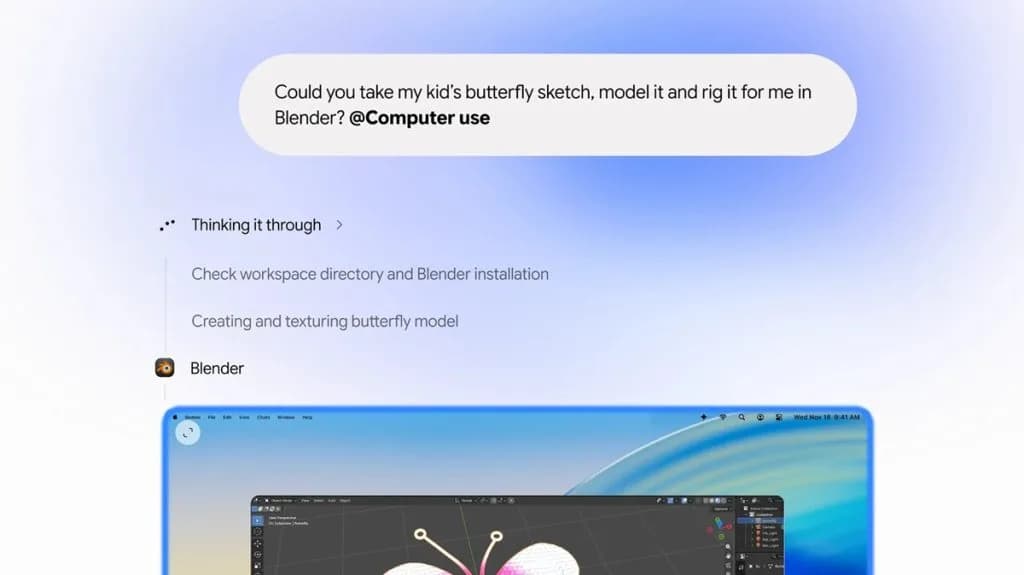
Be the first to comment
Join the argument. No password, just your email or a passkey.