Skip to content
Trending
Smartphones1 min read

Samsung's One UI 9 Adds Driving Report That Tracks Habits Behind The Wheel

The feature lives in Connected devices, auto-starts via Bluetooth, and surfaces speed graphs, harsh-braking counts and weekly summaries — all without touching Android Auto.

By Spec Sheet

The Mobile Desk · (2 hours ago)

Reported fromoutlet, credited1
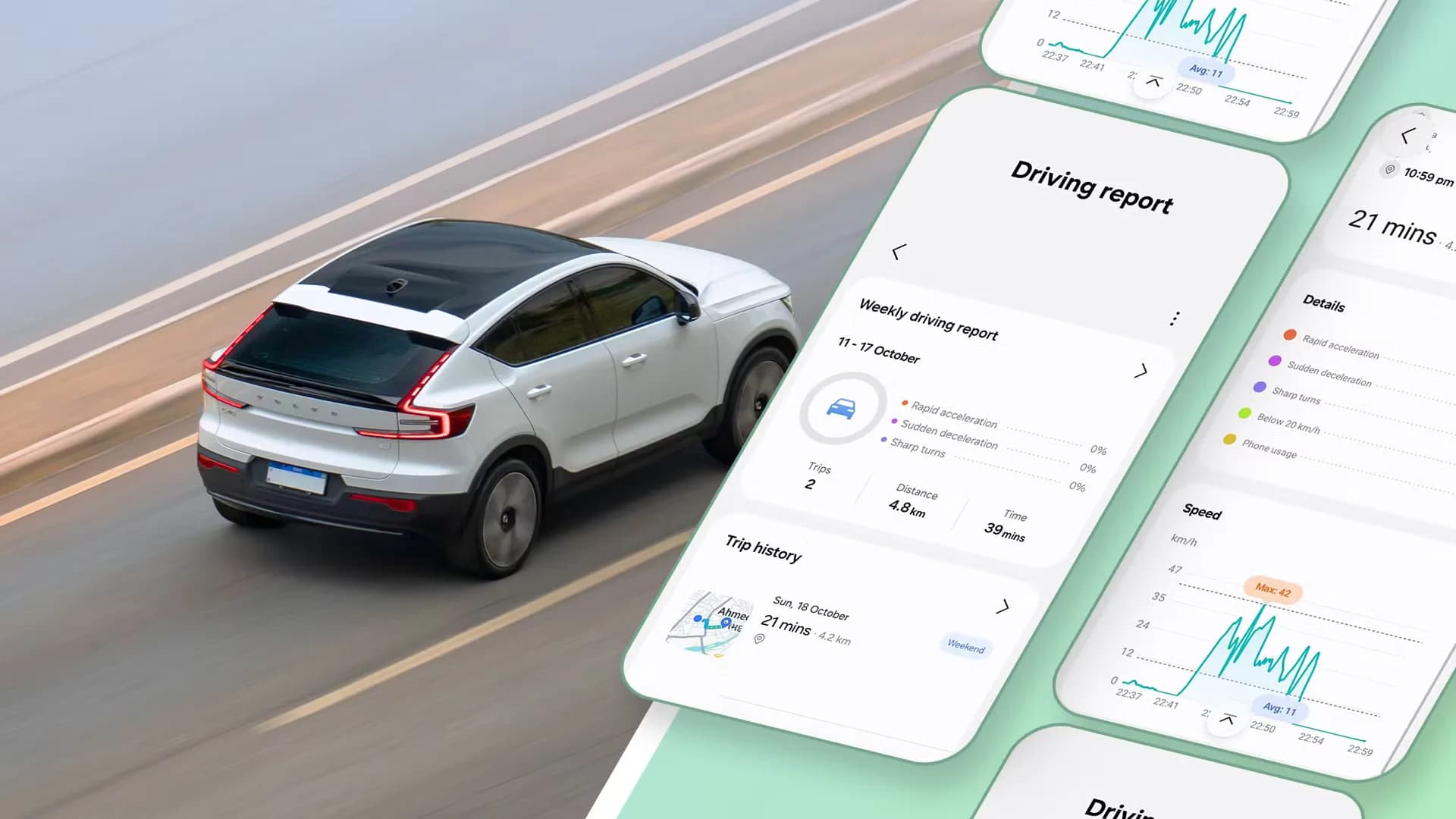
Samsung Galaxy phone showing One UI 9 Driving Report trip summary with map and speed graph
Samsung Galaxy phone showing One UI 9 Driving Report trip summary with map and speed graphPhoto via Android Police

Samsung slipped a driving coach into One UI 9 and didn't bother to announce it. The feature, called Driving Report, sits in the Connected devices menu right above Android Auto. Once you grant location, nearby-device and usage-access permissions — and pick your car from the Vehicles list, it starts a trip automatically the moment your phone pairs with the car's Bluetooth.

Android Auto keeps handling navigation and music. Driving Report just watches in the background.<p>Each trip gets a map with start and end points, total distance, duration, weather conditions and a speed graph that shows average and maximum speeds. The more interesting layer is behavior analysis: rapid accelerations, sudden braking events, sharp turns and time spent interacting with the phone while moving.

A weekly summary rolls those individual trips into a broader view, total time behind the wheel, total distance, and whether the braking-and-acceleration counts are trending down.<p>The interface is clean. No dense charts to decode. The author, a new parent, said the weekly view made him more conscious of following distance and phone glances during his commute.
He also noted what's missing: music-listening stats, monthly trends, personalized tips and deeper Android Auto integration. Samsung has not said whether any of that is coming.<p>One UI 9 is rolling out to Galaxy devices now. Driving Report appears on any phone running the update that pairs with a car over Bluetooth.

No extra hardware, no subscription. Just a toggle in Settings > Connected devices > Driving Report.

Reported from

How this story was made

Written by the Hitechreports desk from the reporting credited above, with facts attributed to their original publishers. We do not test devices ourselves; anything about performance, battery life or cameras comes from the outlets that did. Prices are as reported at the time of writing. Editorial policy · Report an error

What did you make of it?

Filed by The Mobile Desk

Phones from leak to launch to price cut: what was announced, what it costs where, and when it goes on sale. Indian launches and prices included, not appended.

More from this desk →

Be the first to comment

Join the argument. No password, just your email or a passkey.