The Galaxy S26 Ultra now locks apps and hides your screen at the same time — automatically. Samsung has rolled out the One UI 9.5 beta to the S26 Ultra in selected markets, and its most consequential change is a tight integration between two long-demanded features: App lock and Privacy Display.
It launches November 18, with no separate setup required beyond enabling both features in Settings. Rs 1,34,999 in India, $1,299 in the US. The S26 Ultra is the only Galaxy phone confirmed to support this combo right now. One UI 9.5 does not ship with new hardware.
It’s a software update, and it changes how privacy works on the device. App lock itself is new to Galaxy phones: it lets you secure individual apps (WhatsApp, banking apps, Notes) with biometrics or your screen lock credentials, even if the phone is already unlocked. Privacy Display, introduced with the S26 Ultra, narrows the viewing angle of the screen so people beside you see only a dark blur.
Before One UI 9.5, you could trigger Privacy Display manually, or set it to activate on PIN entry, notification pop-ups, or custom routines. Now, it activates the moment an App lock–protected app opens, and stays active while you’re inside that app, even if you pull down the notification shade or open Quick Panel.
That means opening WhatsApp on a crowded train triggers biometric auth then instantly dims the screen, no extra tap, no delay. You don’t have to add each app to Privacy Display’s list. Enable “Locked apps” under Secure features, and the system handles the rest. Settings path: Settings → Display → Privacy display → Conditions for turning on → toggle top switch → then go to Secure features → turn on Locked apps.
Also supported: Samsung Browser’s Secret mode, private Gallery albums, and locked Samsung Notes. Samsung launched the beta through Samsung Members. It’s limited to the Galaxy S26 series in selected markets, and only the S26 Ultra currently supports the App lock + Privacy Display link. The stable version won’t land until after the Galaxy S27 series launch in 2027.
Samsung says the S27 Pro and S27 Ultra will expand Privacy Display support, but doesn’t say whether App lock integration will come to them too. For now, this is an S26 Ultra–only capability. And it’s live.
MDFiled by The Mobile Desk
Phones from leak to launch to price cut: what was announced, what it costs where, and when it goes on sale. Indian launches and prices included, not appended.
More from this desk →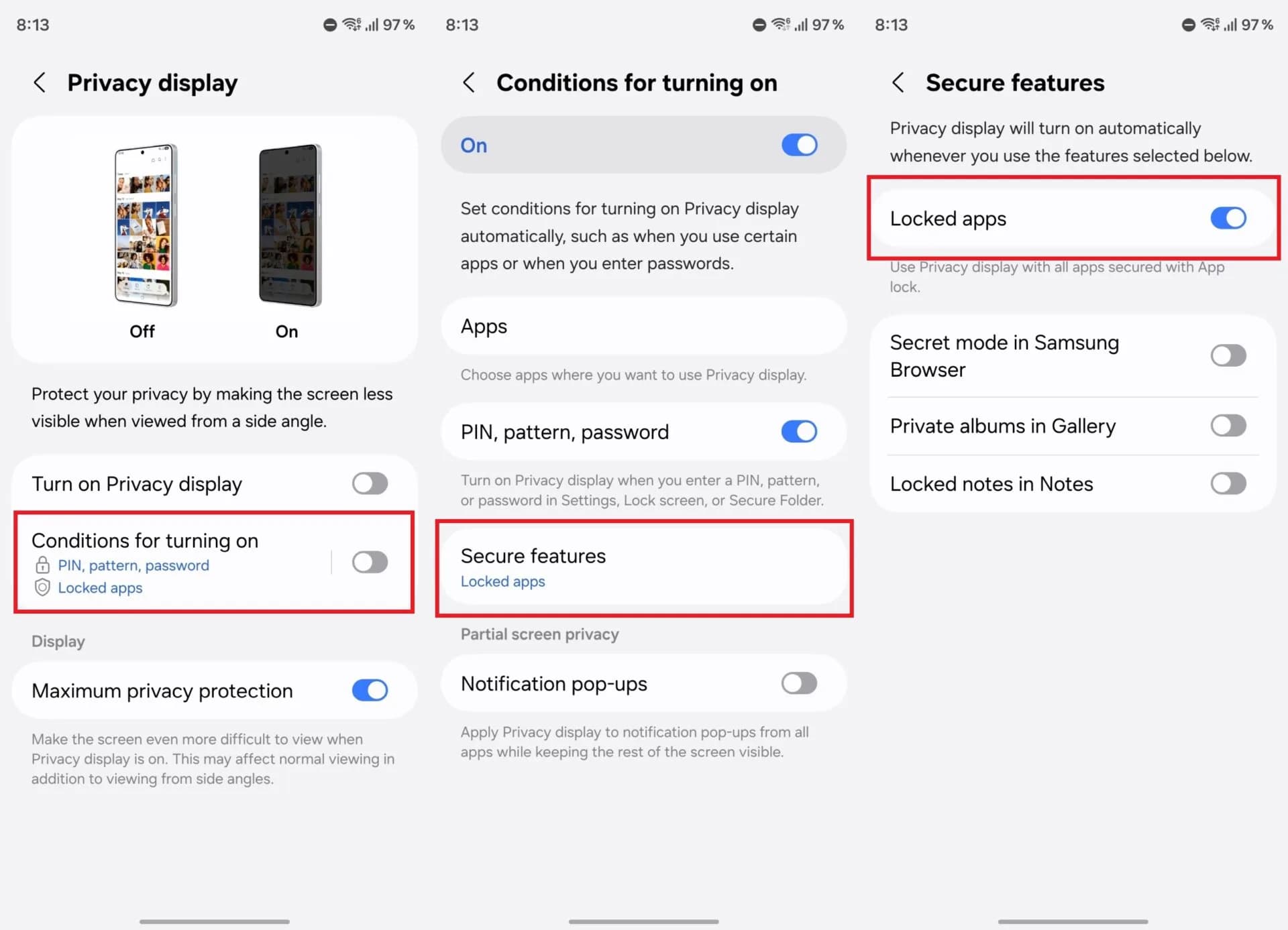
Be the first to comment
Join the argument. No password, just your email or a passkey.