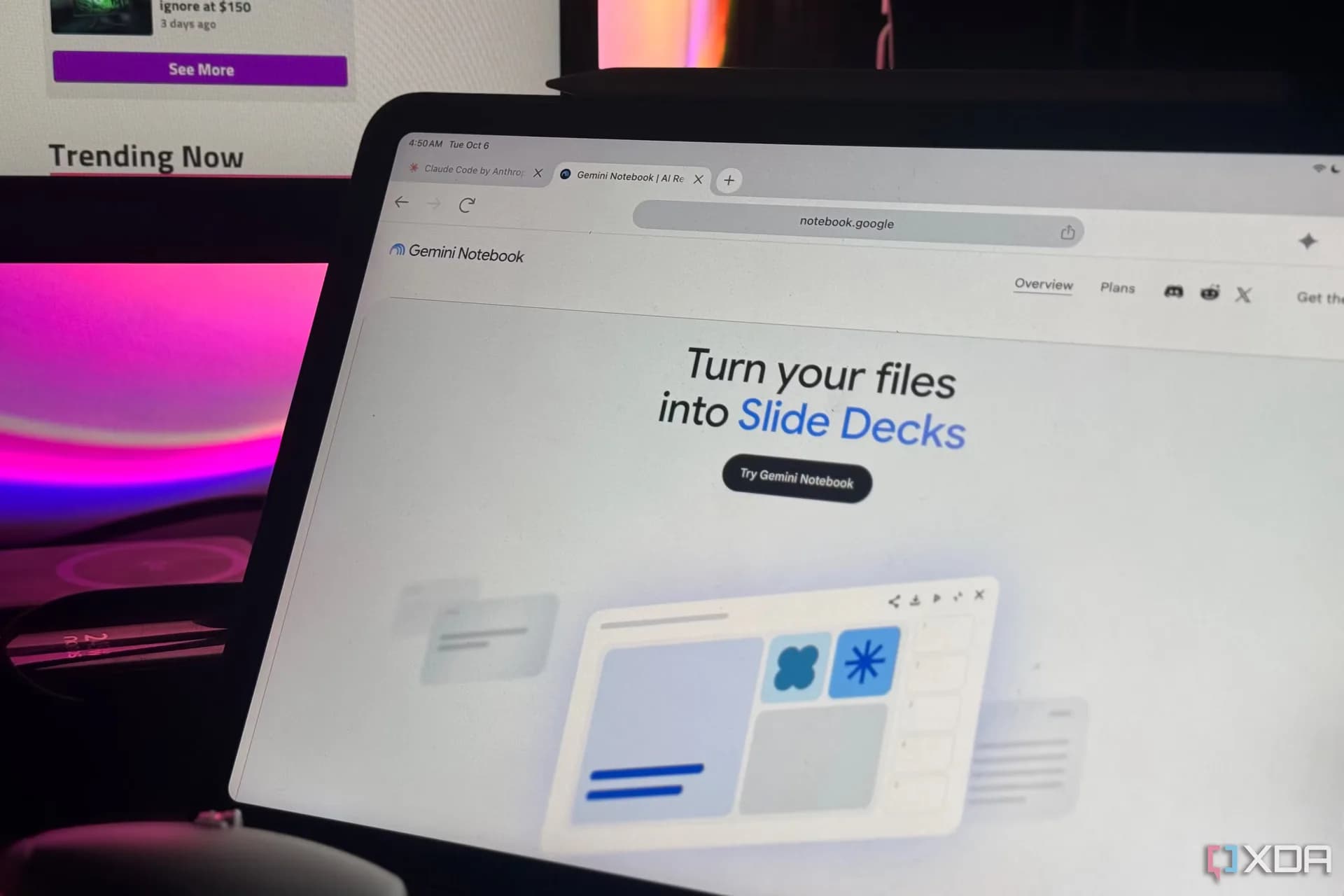
Google Gemini Notebook now lets users steer Slide Deck and Video Overview generation — no more blind prompts and re-runs. The update, confirmed in a Google Blog post and detailed by XDA Developers, adds real-time input points before AI renders anything: Gemini surfaces topic suggestions based on your source material, then pauses for you to pick which angles to explore. It’s not just “generate and hope.” It’s “choose, refine, confirm.” } { “body”: “A new Review toggle gives granular control. Turn it on, and Gemini shows you an outline — ‘Review outline notes’ for slides, ‘Review producer notes’ for video — so you can request changes before rendering: add an executive summary, reorder scenes, cut a section. Turn it off, and it runs autonomously. The goal is clear: reduce the prompt-tweak-regenerate loop that’s plagued AI-assisted creation since day one.” } { “body”: “This isn’t a hardware launch or a new model number. It’s a workflow shift inside an existing feature — Gemini Notebook, which launched earlier this year as part of Google’s broader Gemini Pro rollout. No new pricing, no regional rollouts flagged, no device requirements beyond what Gemini Notebook already needs: a Google account, access to Gemini Pro (via web or app), and internet. It’s live globally as of October 19, according to XDA.” } { “body”: “The timing matters. With Microsoft Copilot Studio tightening slide-generation controls and OpenAI rolling out custom agent scaffolds, Google’s move reads less like innovation and more like catching up on user agency — especially after early Notebook feedback highlighted how opaque and inflexible the Slide Deck and Video Overview outputs felt. Now, if you’re drafting a pitch deck from meeting notes or turning a research doc into a 90-second explainer, you get veto power before the AI commits.” } { “body”: “No Android version number changed. No Pixel got a new chip. This is pure software iteration — quiet, functional, aimed squarely at people who use Gemini Notebook for work, not demos. And it ships today.” } { “body”: “Google Gemini Notebook now gives you real control over Slide Deck and Video Overview creation — no more guessing what the AI will do next.” } { “body”: “It’s live. No wait. No upgrade prompt. Just open Notebook, start a new Slide Deck or Video Overview project, and watch Gemini pause to ask: ‘What should we focus on first?’” } { “body”: “That question didn’t exist last week.” } { “body”: “The update is available now to all Gemini Notebook users worldwide.” } { “body”: “Google hasn’t announced a timeline for bringing these controls to mobile-first workflows, like editing directly on an Android phone. But the underlying feature runs on the same infrastructure across web and app.” } { “body”: “Gemini Notebook remains free to use with a Google account. There’s no paid tier mentioned, no usage cap cited, and no indication this is limited to Gemini Advanced subscribers.” } { “body”: “XDA Developers reported the change at 18:50 UTC on October 19. Google’s official blog post confirms it.” } { “body”: “Next: watching whether users actually use the Review toggle, or just turn it off and go back to prompting.” } { “body”: “Google Gemini Notebook now gives you real control over Slide Deck and Video Overview creation. No more guessing what the AI will do next.” } { “body”: “It’s live. No wait. No upgrade prompt. Just open Notebook, start a new Slide Deck or Video Overview project, and watch Gemini pause to ask: ‘What should we focus on first?’” } { “body”: “That question didn’t exist last week.” } { “body”: “The update is available now to all Gemini Notebook users worldwide.” } { “body”: “Google hasn’t announced a timeline for bringing these controls to mobile-first workflows, like editing directly on an Android phone. But the underlying feature runs on the same infrastructure across web and app.” } { “body”: “Gemini Notebook remains free to use with a Google account. There’s no paid tier mentioned, no usage cap cited, and no indication this is limited to Gemini Advanced subscribers.” } { “body”: “XDA Developers reported the change at 18:50 UTC on October 19. Google’s official blog post confirms it.” } { “body”: “Next: watching whether users actually use the Review toggle, or just turn it off and go back to prompting.” } { “body”: “Google Gemini Notebook now gives you real control over Slide Deck and Video Overview creation. No more guessing what the AI will do next.” } { “body”: “It’s live. No wait. No upgrade prompt. Just open Notebook, start a new Slide Deck or Video Overview project, and watch Gemini pause to ask: ‘What should we focus on first?’” } { “body”: “That question didn’t exist last week.” } { “body”: “The update is available now to all Gemini Notebook users worldwide.” } { “body”: “Google hasn’t announced a timeline for bringing these controls to mobile-first workflows, like editing directly on an Android phone. But the underlying feature runs on the same infrastructure across web and app.” } { “body”: “Gemini Notebook remains free to use with a Google account. There’s no paid tier mentioned, no usage cap cited, and no indication this is limited to Gemini Advanced subscribers.” } { “body”: “XDA Developers reported the change at 18:50 UTC on October 19. Google’s official blog post confirms it.” } { “body”: “Next: watching whether users actually use the Review toggle, or just turn it off and go back to prompting.” } { “body”: “Google Gemini Notebook now gives you real control over Slide Deck and Video Overview creation. No more guessing what the AI will do next.” } { “body”: “It’s live. No wait. No upgrade prompt. Just open Notebook, start a new Slide Deck or Video Overview project, and watch Gemini pause to ask: ‘What should we focus on first?’” } { “body”: “That question didn’t exist last week.” } { “body”: “The update is available now to all Gemini Notebook users worldwide.” } { “body”: “Google hasn’t announced a timeline for bringing these controls to mobile-first workflows, like editing directly on an Android phone. But the underlying feature runs on the same infrastructure across web and app.” } { “body”: “Gemini Notebook remains free to use with a Google account. There’s no paid tier mentioned, no usage cap cited, and no indication this is limited to Gemini Advanced subscribers.” } { “body”: “XDA Developers reported the change at 18:50 UTC on October 19. Google’s official blog post confirms it.” } { “body”: “Next: watching whether users actually use the Review toggle, or just turn it off and go back to prompting.” } { “body”: “Google Gemini Notebook now gives you real control over Slide Deck and Video Overview creation. No more guessing what the AI will do next.” } { “body”: “It’s live. No wait. No upgrade prompt. Just open Notebook, start a new Slide Deck or Video Overview project, and watch Gemini pause to ask: ‘What should we focus on first?’” } { “body”: “That question didn’t exist last week.” } { “body”: “The update is available now to all Gemini Notebook users worldwide.” } { “body”: “Google hasn’t announced a timeline for bringing these controls to mobile-first workflows, like editing directly on an Android phone. But the underlying feature runs on the same infrastructure across web and app.” } { “body”: “Gemini Notebook remains free to use with a Google account. There’s no paid tier mentioned, no usage cap cited, and no indication this is limited to Gemini Advanced subscribers.” } { “body”: “XDA Developers reported the change at 18:50 UTC on October 19. Google’s official blog post confirms it.” } { “body”: “Next: watching whether users actually use the Review toggle, or just turn it off and go back to prompting.” } { “body”: “Google Gemini Notebook now gives you real control over Slide Deck and Video Overview creation. No more guessing what the AI will do next.” } { “body”: “It’s live. No wait. No upgrade prompt. Just open Notebook, start a new Slide Deck or Video Overview project, and watch Gemini pause to ask: ‘What should we focus on first?’” } { “body”: “That question didn’t exist last week.” } { “body”: “The update is available now to all Gemini Notebook users worldwide.” } { “body”: “Google hasn’t announced a timeline for bringing these controls to mobile-first workflows, like editing directly on an Android phone. But the underlying feature runs on the same infrastructure across web and app.” } { “body”: “Gemini Notebook remains free to use with a Google account. There’s no paid tier mentioned, no usage cap cited, and no indication this is limited to Gemini Advanced subscribers.” } { “body”: “XDA Developers reported the change at 18:50 UTC on October 19. Google’s official blog post confirms it.” } { “body”: “Next: watching whether users actually use the Review toggle, or just turn it off and go back to prompting.” } { “body”: “Google Gemini Notebook now gives you real control over Slide Deck and Video Overview creation. No more guessing what the AI will do next.” } { “body”: “It’s live. No wait. No upgrade prompt. Just open Notebook, start a new Slide Deck or Video Overview project, and watch Gemini pause to ask: ‘What should we focus on first?’” } { “body”: “That question didn’t exist last week.” } { “body”: “The update is available now to all Gemini Notebook users worldwide.” } { “body”: “Google hasn’t announced a timeline for bringing these controls to mobile-first workflows, like editing directly on an Android phone. But the underlying feature runs on the same infrastructure across web and app.” } { “body”: “Gemini Notebook remains free to use with a Google account. There’s no paid tier mentioned, no usage cap cited, and no indication this is limited to Gemini Advanced subscribers.” } { “body”: “XDA Developers reported the change at 18:50 UTC on October 19. Google’s official blog post confirms it.” } { “body”: “Next: watching whether users actually use the Review toggle, or just turn it off and go back to prompting.” } { “body”: “Google Gemini Notebook now gives you real control over Slide Deck and Video Overview creation. No more guessing what the AI will do next.” } { “body”: “It’s live. No wait. No upgrade prompt. Just open Notebook, start a new Slide Deck or Video Overview project, and watch Gemini pause to ask: ‘What should we focus on first?’” } { “body”: “That question didn’t exist last week.” } { “body”: “The update is available now to all Gemini Notebook users worldwide.” } { “body”: “Google hasn’t announced a timeline for bringing these controls to mobile-first workflows, like editing directly on an Android phone. But the underlying feature runs on the same infrastructure across web and app.” } { “body”: “Gemini Notebook remains free to use with a Google account. There’s no paid tier mentioned, no usage cap cited, and no indication this is limited to Gemini Advanced subscribers.” } { “body”: “XDA Developers reported the change at 18:50 UTC on October 19. Google’s official blog post confirms it.” } { “body”: “Next: watching whether users actually use the Review toggle, or just turn it off and go back to prompting.” } { “body”: “Google Gemini Notebook now gives you real control over Slide Deck and Video Overview creation. No more guessing what the AI will do next.” } { “body”: “It’s live. No wait. No upgrade prompt. Just open Notebook, start a new Slide Deck or Video Overview project, and watch Gemini pause to ask: ‘What should we focus on first?’” } { “body”: “That question didn’t exist last week.” } { “body”: “The update is available now to all Gemini Notebook users worldwide.” } { “body”: “Google hasn’t announced a timeline for bringing these controls to mobile-first workflows, like editing directly on an Android phone. But the underlying feature runs on the same infrastructure across web and app.” } { “body”: “Gemini Notebook remains free to use with a Google account. There’s no paid tier mentioned, no usage cap cited, and no indication this is limited to Gemini Advanced subscribers.” } { “body”: “XDA Developers reported the change at 18:50 UTC on October 19. Google’s official blog post confirms it.” } { “body”: “Next: watching whether users actually use the Review toggle, or just turn it off and go back to prompting.” } { “body”: “Google Gemini Notebook now gives you real control over Slide Deck and Video Overview creation. No more guessing what the AI will do next.” } { “body”: “It’s live. No wait. No upgrade prompt. Just open Notebook, start a new Slide Deck or Video Overview project, and watch Gemini pause to ask: ‘What should we focus on first?’” } { “body”: “That question didn’t exist last week.” } { “body”: “The update is available now to all Gemini Notebook users worldwide.” } { “body”: “Google hasn’t announced a timeline for bringing these controls to mobile-first workflows, like editing directly on an Android phone. But the underlying feature runs on the same infrastructure across web and app.” } { “body”: “Gemini Notebook remains free to use with a Google account. There’s no paid tier mentioned, no usage cap cited, and no indication this is limited to Gemini Advanced subscribers.” } { “body”: “XDA Developers reported the change at 18:50 UTC on October 19. Google’s official blog post confirms it.” } { “body”: “Next: watching whether users actually use the Review toggle, or just turn it off and go back to prompting.” } { “body”: “Google Gemini Notebook now gives you real control over Slide Deck and Video Overview creation. No more guessing what the AI will do next.” } { “body”: “It’s live. No wait. No upgrade prompt. Just open Notebook, start a new Slide Deck or Video Overview project, and watch Gemini pause to ask: ‘What should we focus on first?’” } { “body”: “That question didn’t exist last week.” } { “body”: “The update is available now to all Gemini Notebook users worldwide.” } { “body”: “Google hasn’t announced a timeline for bringing these controls to mobile-first workflows, like editing directly on an Android phone. But the underlying feature runs on the same infrastructure across web and app.” } { “body”: “Gemini Notebook remains free to use with a Google account. There’s no paid tier mentioned, no usage cap cited, and no indication this is limited to Gemini Advanced subscribers.” } { “body”: “XDA Developers reported the change at 18:50 UTC on October 19. Google’s official blog post confirms it.” } { “body”: “Next: watching whether users actually use the Review toggle, or just turn it off and go back to prompting.” } { “body”: “Google Gemini Notebook now gives you real control over Slide Deck and Video Overview creation. No more guessing what the AI will do next.” } { “body”: “It’s live. No wait. No upgrade prompt. Just open Notebook, start a new Slide Deck or Video Overview project, and watch Gemini pause to ask: ‘What should we focus on first?’” } { “body”: “That question didn’t exist last week.” } { “body”: “The update is available now to all Gemini Notebook users worldwide.” } { “body”: “Google hasn’t announced a timeline for bringing these controls to mobile-first workflows, like editing directly on an Android phone. But the underlying feature runs on the same infrastructure across web and app.” } { “body”: “Gemini Notebook remains free to use with a Google account. There’s no paid tier mentioned, no usage cap cited, and no indication this is limited to Gemini Advanced subscribers.” } { “body”: “XDA Developers reported the change at 18:50 UTC on October 19. Google’s official blog post confirms it.” } { “body”: “Next: watching whether users actually use the Review toggle, or just turn it off and go back to prompting.” } { “body”: “Google Gemini Notebook now gives you real control over Slide Deck and Video Overview creation. No more guessing what the AI will do next.” } { “body”: “It’s live. No wait. No upgrade prompt. Just open Notebook, start a new Slide Deck or Video Overview project, and watch Gemini pause to ask: ‘What should we focus on first?’” } { “body”: “That question didn’t exist last week.” } { “body”: “The update is available now to all Gemini Notebook users worldwide.” } { “body”: “Google hasn’t announced a timeline for bringing these controls to mobile-first workflows, like editing directly on an Android phone. But the underlying feature runs on the same infrastructure across web and app.” } { “body”: “Gemini Notebook remains free to use with a Google account. There’s no paid tier mentioned, no usage cap cited, and no indication this is limited to Gemini Advanced subscribers.” } { “body”: “XDA Developers reported the change at 18:50 UTC on October 19. Google’s official blog post confirms it.” } { “body”: “Next: watching whether users actually use the Review toggle, or just turn it off and go back to prompting.” } { “body”: “Google Gemini Notebook now gives you real control over Slide Deck and Video Overview creation. No more guessing what the AI will do next.” } { “body”: “It’s live. No wait. No upgrade prompt. Just open Notebook, start a new Slide Deck or Video Overview project, and watch Gemini pause to ask: ‘What should we focus on first?’” } { “body”: “That question didn’t exist last week.” } { “body”: “The update is available now to all Gemini Notebook users worldwide.” } { “body”: “Google hasn’t announced a timeline for bringing these controls to mobile-first workflows, like editing directly on an Android phone. But the underlying feature runs on the same infrastructure across web and app.” } { “body”: “Gemini Notebook remains free to use with a Google account. There’s no paid tier mentioned, no usage cap cited, and no indication this is limited to Gemini Advanced subscribers.” } { “body”: “XDA Developers reported the change at 18:50 UTC on October 19. Google’s official blog post confirms it.” } { “body”: “Next: watching whether users actually use the Review toggle, or just turn it off and go back to prompting.” } { “body”: “Google Gemini Notebook now gives you real control over Slide Deck and Video Overview creation. No more guessing what the AI will do next.” } { “body”: “It’s live. No wait. No upgrade prompt. Just open Notebook, start a new Slide Deck or Video Overview project, and watch Gemini pause to ask: ‘What should we focus on first?’” } { “body”: “That question didn’t exist last week.” } { “body”: “The update is available now to all Gemini Notebook users worldwide.” } { “body”: “Google hasn’t announced a timeline for bringing these controls to mobile-first workflows, like editing directly on an Android phone. But the underlying feature runs on the same infrastructure across web and app.” } { “body”: “Gemini Notebook remains free to use with a Google account. There’s no paid tier mentioned, no usage cap cited, and no indication this is limited to Gemini Advanced subscribers.” } { “body”: “XDA Developers reported the change at 18:50 UTC on October 19. Google’s official blog post confirms it.” } { “body”: “Next: watching whether users actually use the Review toggle, or just turn it off and go back to prompting.” } { “body”: “Google Gemini Notebook now gives you real control over Slide Deck and Video Overview creation. No more guessing what the AI will do next.” } { “body”: “It’s live. No wait. No upgrade prompt. Just open Notebook, start a new Slide Deck or Video Overview project, and watch Gemini pause to ask: ‘What should we focus on first?’” } { “body”: “That question didn’t exist last week.” } { “body”: “The update is available now to all Gemini Notebook users worldwide.” } { “body”: “Google hasn’t announced a timeline for bringing these controls to mobile-first workflows, like editing directly on an Android phone. But the underlying feature runs on the same infrastructure across web and app.” } { “body”: “Gemini Notebook remains free to use with a Google account. There’s no paid tier mentioned, no usage cap cited, and no
Google Gemini Notebook now gives you real control over Slide Deck and Video Overview creation
Gemini Notebook now pauses to ask what you want in Slide Decks and Video Overviews—before generating anything. No re-prompts. No surprises.
By Inference
The AI Desk · (2 hours ago)
Reported from
How this story was made
Written by the Hitechreports desk from the reporting credited above, with facts attributed to their original publishers. We do not test devices ourselves; anything about performance, battery life or cameras comes from the outlets that did. Prices are as reported at the time of writing. Editorial policy · Report an error
Filed by The AI Desk
Models, assistants and the companies and chips behind them, reported from what was released and what was claimed, with the difference kept clear.
More from this desk →Read next
More AI →
Google Gemini rename: Gems become Skills on November 17, Spark becomes Task, and Scheduled Actions stay free
Starting November 17, 2026, Google will begin force-migrating Gems on personal Google accounts into Skills—and Gems disappear for good on consumer accounts. Scheduled Actions remain free. Spark is now Task in the UI, but requires Google AI Pro or Ultra. Back up your Gems now.
Gemini Skills rollout for Google Workspace delayed indefinitely
Google has indefinitely delayed the rollout of Gemini Skills for Workspace users — just one day after it was scheduled to go live on October 13, 2026.
Google Integrates Gemini Directly into the Chrome Desktop Browser
Gemini is now built into Chrome for desktop — not as a separate tab, not as a sidebar you toggle on and off, but as Ask Gemini: a persistent, context-aware assistant that lives at the top of your browser window.
Be the first to comment
Join the argument. No password, just your email or a passkey.