Samsung Galaxy phones have more usable buttons than most people realize — and the ability to reprogram them is built in, no root or third-party app required. A detailed walkthrough on XDA Developers reveals how Galaxy owners can unlock hidden functions across physical side keys, volume buttons, and even on-screen floating controls, all through settings already present on devices running One UI 6.1 or later.
The guide applies broadly, but examples cited come from a Galaxy S23 Ultra. Samsung hasn’t confirmed whether older models (S21 series, Z Fold/Flip variants) support every option, though many do via Good Lock updates. No new firmware or beta program is needed. Just Settings > Advanced features > Side button, and then digging a little deeper.
That menu lets users redefine double-press and long-press actions for the power key. Default: double-press opens Camera. Change it to launch Samsung Notes, and choose which Notes action fires: voice note, pen sketch, or blank text page. Or assign it to a third-party app like Notesnook, with full action-level control visible behind the cog icon.
Long press stays limited: only Digital Assistant or Power Off menu. But double press? Wide open. Then there’s the Assistant menu, an accessibility feature that drops a movable, persistent floating button onto your screen.
It’s not a shortcut launcher. It’s a system-control panel: brightness slider, Quick Settings toggle, notification drawer, screen rotation lock, Bixby launch, or even ‘turn screen off’. You pick which items appear. It’s designed for one-handed use, and as the XDA writer notes, for people managing chronic pain or motor limitations.
It works across apps, stays anchored at the edge unless dragged, and can replace the side button entirely if you prefer tapping over pressing. None of this requires Good Lock. But if you want more, Good Lock’s Routines+ plugin adds another layer. It unlocks volume-down double-press to open Weather, volume-up long-press to trigger a location-based routine, or Home-button macros that auto-tap through multi-step app flows, like opening Notesnook and creating a new note in one tap.
Those macros live inside Modes and Routines widgets, which double as custom dashboards on your home screen. Samsung doesn’t advertise this depth. It’s buried. But it’s real, functional, and available now on millions of Galaxy devices globally, including every S23, S24, S25, S26, and S27 model sold in the US and India.
No price. No launch event. No new hardware. Just capability, sitting idle until someone looks.
Good Lock remains free in the Galaxy Store. Routines+ is free to install, though some advanced triggers (like geofence-based button actions) require a Galaxy Store subscription. Samsung hasn’t announced plans to fold these features into stock One UI, nor has it confirmed support for pre-S22 devices. But for anyone holding a Galaxy S23 Ultra or newer, the buttons are already yours, if you know where to tap.
MDFiled by The Mobile Desk
Phones from leak to launch to price cut: what was announced, what it costs where, and when it goes on sale. Indian launches and prices included, not appended.
More from this desk →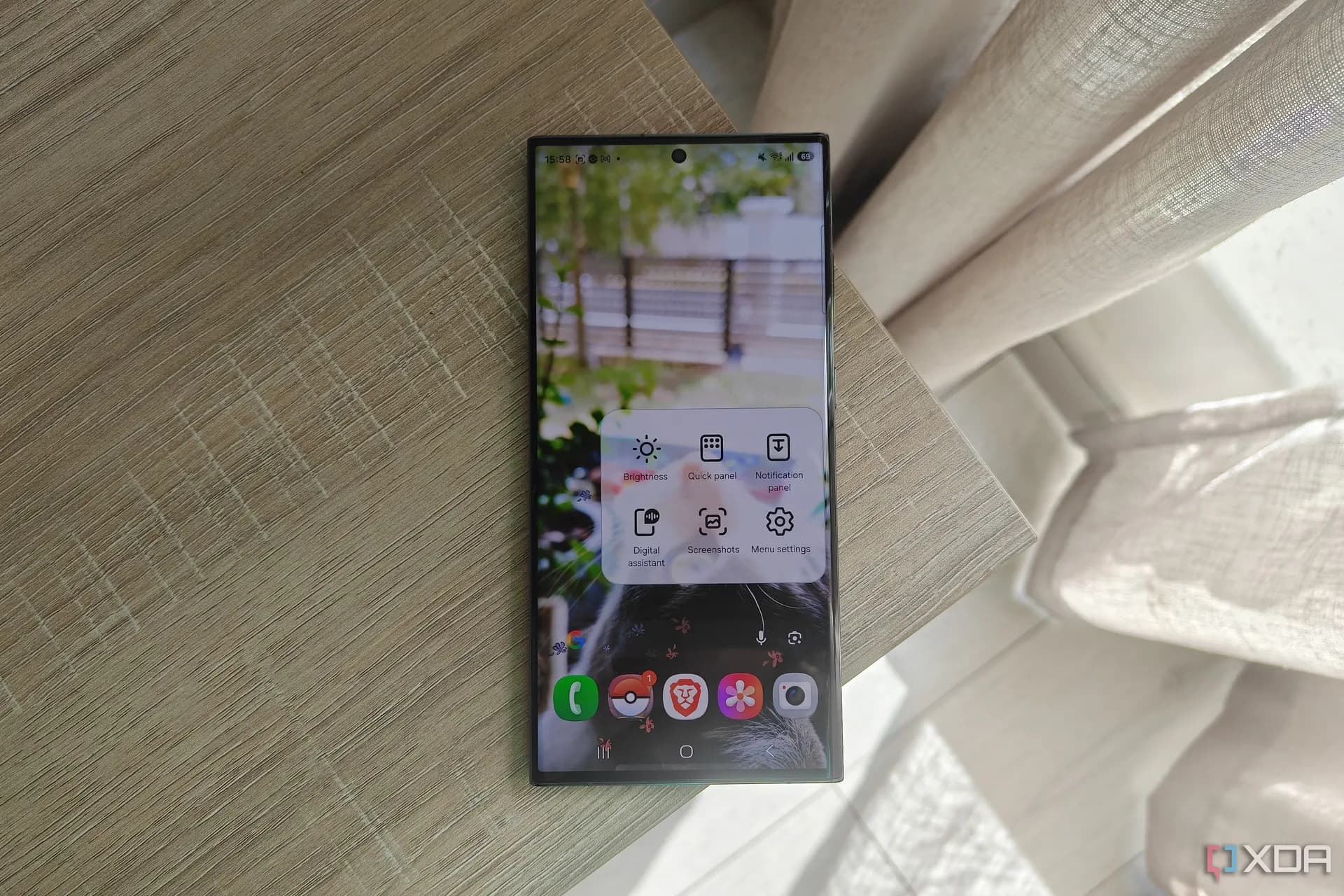
Be the first to comment
Join the argument. No password, just your email or a passkey.