Windows 11 26H2 users are getting a new native Search interface this week — not as part of a major feature update, but via optional patch KB5132057, released November 19. The update carries build number 26300.10075 for 26H2 systems (26200.10075 for 25H2), and the Search overhaul is rolling out gradually even after installation.
It replaces the old WebView2-based UI with one built entirely on WinUI 3, Microsoft’s modern native framework for Windows desktop apps. That means less memory overhead, faster launch, and tighter integration with system themes and accessibility settings. It appears instantly when you click the Search box, defaults to a compact layout, and expands only when scrolling through long result lists.
One quirk remains: it opens centered on screen, regardless of taskbar alignment, a fix Microsoft says is in progress. You can disable web and Microsoft Store search results directly in Settings > Privacy & security > Search. That toggle arrived in stages starting late August for non-Insiders, following a June 2026 Insider announcement.
Users who previously relied on PowerShell scripts to block web results now have a GUI option, and it works for both web and Store. The new Search is fast. Typing “sy” surfaces System Shock second in results, not because it’s alphabetically close, but because usage patterns feed ranking. It handles typos gracefully and returns relevant matches from files, apps, settings, and Control Panel pages after just two or three characters.
Inline actions let you adjust volume, toggle Night Light or Bluetooth, lock your PC, or change mouse pointer size, all without leaving Search. But they’re phrase-sensitive: “decrease volume” triggers an action. “adjust volume” opens Sound settings. Microsoft calls this a start, not a finish.
Copilot integration is coming. Microsoft confirmed it will land “later this year”, no exact date given, and says it will be opt-in, like the earlier Ask Copilot test in Insider builds. That version replaced the Search box with a Copilot prompt. This one will embed Copilot into the same UI.
Microsoft promises no automatic installation or silent activation. Users who removed Copilot entirely will not get it back without explicit consent. The update is optional. It won’t install unless you’ve enabled “Get the latest updates as soon as they’re available” in Windows Update.
So if you’re on 26H2 and haven’t seen the new Search yet, it’s likely still in rollout, not missing. This isn’t an app launch. It’s a core OS component refresh, one that improves local discovery, cuts bloat, and adds utility. But it arrives with a caveat baked in: the AI layer is already queued up behind it.
SDFiled by The Software Desk
Apps, platforms, operating system releases, security fixes and the features arriving in them.
More from this desk →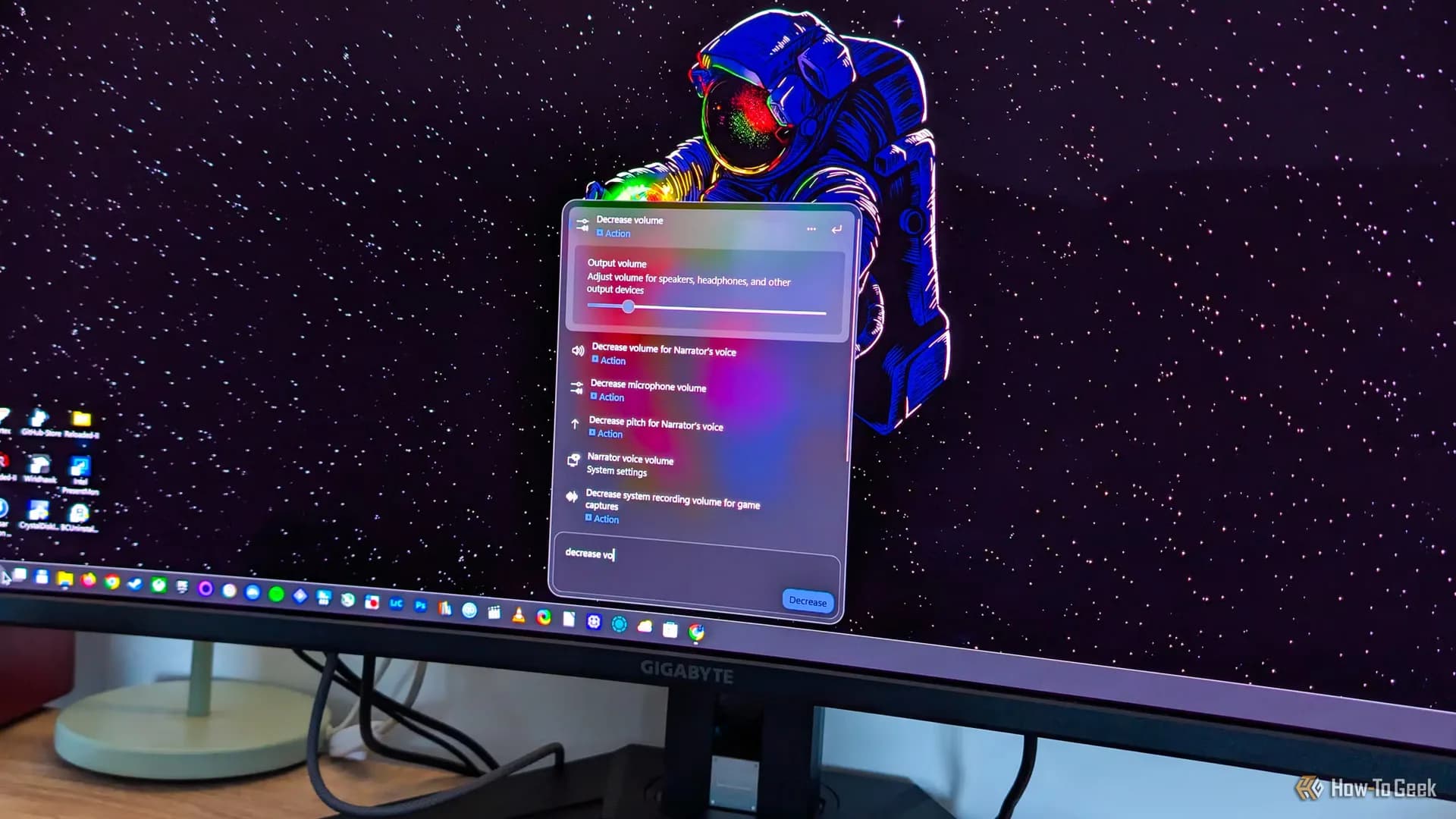


Be the first to comment
Join the argument. No password, just your email or a passkey.