Microsoft is finally letting Windows 11 check your internet speed without shoving you into a browser tab first.
The company has started testing a built-in speed test tool in Quick Settings, the panel you open from the Taskbar to flip Wi-Fi, Bluetooth and volume. It's rolling out on the Experimental channel of the Windows Insider Program in build 26340.9767, according to Windows Central, which first spotted the change.
Until now, clicking "Test internet speed" from the network flyout or system tray simply opened Microsoft Edge and dropped you onto Bing's speed test page. The new version runs the whole thing inside Quick Settings itself, showing download speed, upload speed and ping without ever launching a browser.
There are three ways in. Open Quick Settings from the Taskbar and pick the new "Speed test" option, start one from the Wi-Fi or Cellular flyout, or right-click the network icon in the system tray and choose "Test internet speed." Results and progress show up right there in the panel.
Microsoft hasn't named the provider behind the tool in its release notes, but a tooltip inside the feature says it's "powered by SPEEDTEST," and the accompanying link points to Ookla's privacy policy. In other words, it's the same measurement service as before, just without the detour through Edge and Bing.
If the option doesn't show up on build 26340.9767 or later, Insiders can go to Settings > Windows Update > Insider Program > Feature flags, switch on "Quick Settings Speed Test," and restart. Microsoft hasn't said when the feature leaves preview and reaches everyone running Windows 11.
The speed test isn't the only change in this build aimed at keeping routine tasks off the web. Microsoft 365 subscribers get an updated subscription panel in Settings that lets them turn recurring billing back on directly from the operating system, instead of opening a separate webpage tied to their Microsoft account to manage it.
Taken together, the two changes point at the same complaint users have had about Windows 11 for years: shortcuts that look like native features but are really just links to a browser and, often, to Bing or Edge specifically. A connection-troubleshooting tool that requires opening a browser to find out if your browser is the problem has never made much sense, and Microsoft appears to be quietly cleaning up a handful of these cases rather than announcing them with fanfare.
None of this changes what Speedtest measures or how accurate it is, since the underlying Ookla service hasn't changed. What's different is where the result shows up and how many clicks it takes to get there.
For now the feature is limited to Experimental channel Insiders willing to download preview builds and poke around in feature flags. A wider rollout, and any word on whether it reaches Windows 11 Home, Pro or both, will depend on how testing goes from here.
CDFiled by The Computing Desk
Laptops, desktops, processors, graphics cards and the operating systems that run on them.
More from this desk →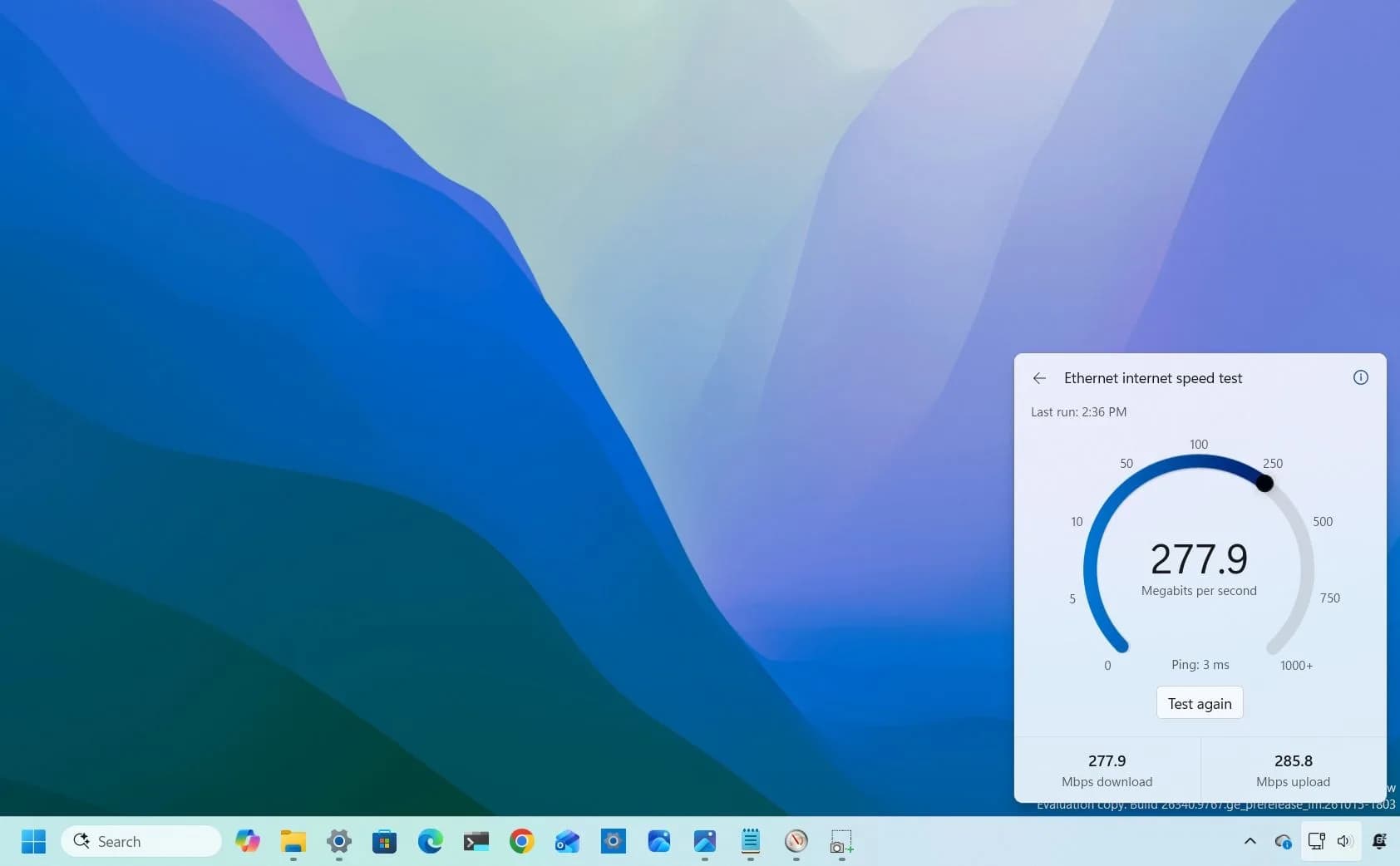

Be the first to comment
Join the argument. No password, just your email or a passkey.