YouTube is pulling the Subscriptions shortcut out of the bottom navigation bar on Android and iOS, dismantling an interface layout that has stood since 2017. The tab will now sit at the very top of the Home view under the abbreviated label "Subs".
The shift is going to disrupt years of ingrained habit. For nearly a decade, regular viewers have reached instinctively for the fourth icon on the bottom tray to see recent uploads from channels they follow. Now, tapping into that list means reaching toward the top of the glass, where a red underline marks the new location right beside the default Home tab.
Google began experimenting with the redesign earlier this year, framing it as part of an effort to clean up the primary viewing area. Beside the repositioned Subs header, the top carousel now hosts dedicated feeds for Live broadcasts along with Music and Movies & TV. That media tab will only show up for accounts that hold active paid add-ons like Primetime Channels. By promoting those categories into the main header, the update also clears out the old slide-out navigation drawer entirely.
The interface cleanup arrives in tandem with a new feature called custom feeds, which lets viewers build their own algorithm-driven tabs using plain language. Tapping a plus icon at the top of the Home screen summons an input field where you describe the channels, topics, or mood you want to watch. YouTube cites examples such as asking for brief guided meditations to unwind after work. Once generated, the resulting collection locks into place as an ongoing tab in the top bar, accessible whenever you open the app. If your tastes change, an editing box pinned to the top of the feed lets you adjust the prompt.
There is a catch regarding how many custom views you can run. Free users can save three custom views at once. Paying YouTube Premium members get an allowance of eight. Everything created through the feature synchronizes across both handheld devices and the desktop website, keeping your tailored categories consistent regardless of which screen you use.
The initial rollout is limited in both geography and language. Google is delivering custom feeds first to signed-in, English-speaking accounts in the United States across both mobile operating systems and desktop browsers. Broader international expansion will follow later as YouTube monitors how viewers adapt to having their subscription feed relocated.
SDFiled by The Software Desk
Apps, platforms, operating system releases, security fixes and the features arriving in them.
More from this desk →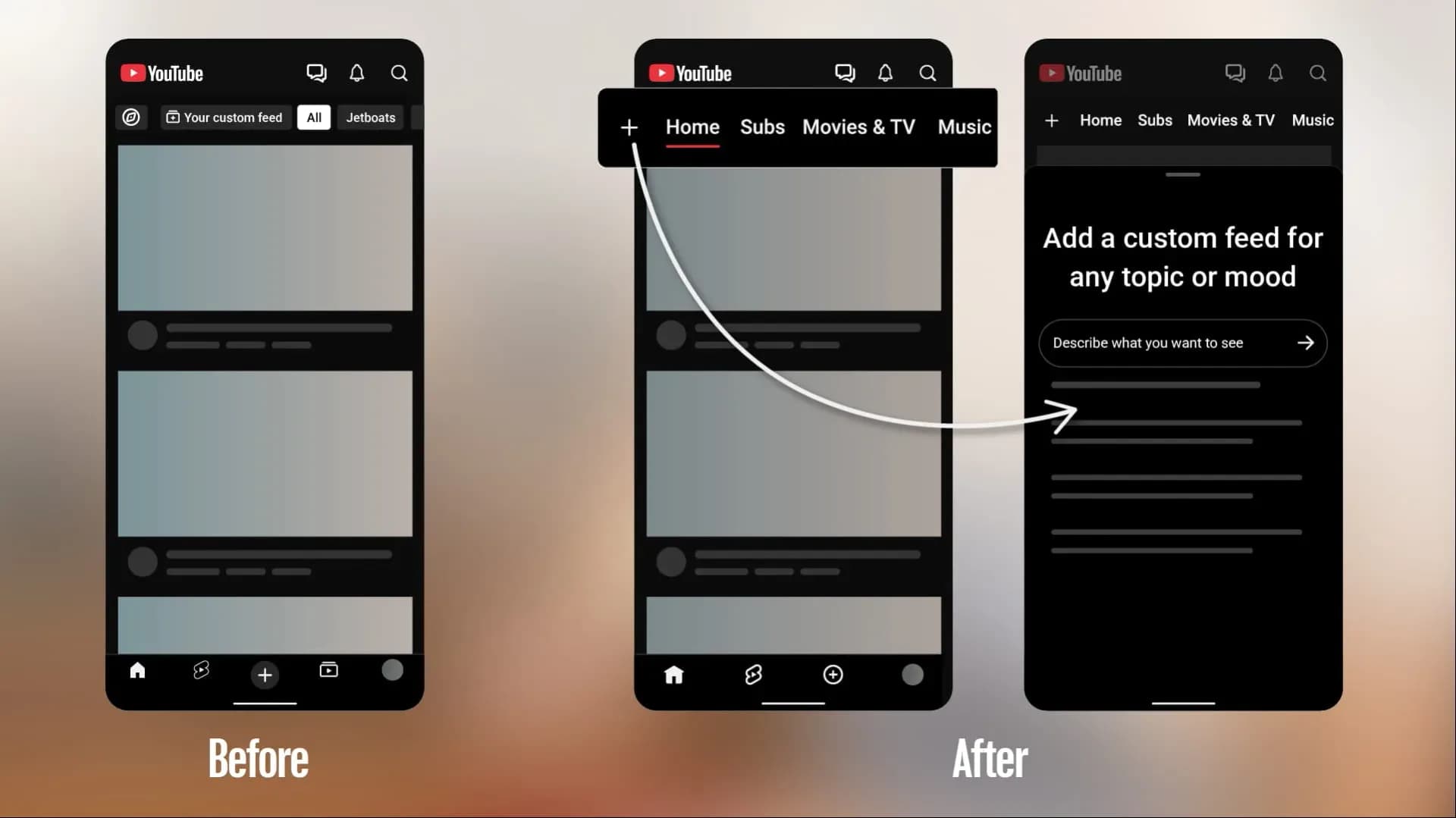
Be the first to comment
Join the argument. No password, just your email or a passkey.