Cars running Android Auto often default to an unvarying dashboard layout. A driver docks their phone, taps Google Maps directions by car, starts a streaming playlist, and repeats that setup trip after trip. It gets predictable fast.
Yet the in-car operating setup accommodates a wider catalog of utilities than most drivers touch on their morning commute. A breakdown from How-To Geek highlighted four distinct applications designed to handle offline routing, trip budgeting, local audio tuning, and storm monitoring without leaning entirely on familiar platform defaults.
Offline Routing and Privacy
Google Maps directions dominate automotive screens, but cellular data drops can leave drivers stranded away from city corridors. Organic Maps offers a clean break from that reliance. Built as an open-source, tracker-free navigation utility without advertisements, the application operates fully through pre-downloaded map files.
Drivers retain turn-by-turn voice guidance without an active mobile connection. The software also layers in details suited for remote driving, including cycling paths, hiking trails, and bookmarkable locations like nearby coffee spots. While it skips the live traffic calculations that define mainstream commercial tools, it provides dependable guidance when cellular coverage disappears entirely on vacation or rural trips.
Keeping Tabs on Travel Costs
Budget management rarely makes it to the center console, but Fuelio brings vehicle operational expenses into direct view. The application lets motorists log fuel fill-ups directly from the car's screen, recording mileage, trip logs, and fuel economy numbers as they happen.
The car interface also pulls up local pump prices and GPS trip-recording controls. Managing long-term upkeep like parking receipts, repair visits, and insurance still requires pulling out the handset, but quick dashboard entries eliminate the usual guesswork around what daily commuting costs across weeks and months. It will not lower the price of petrol, but it clarifies where vehicle cash actually goes.
Sound Control and Real-Time Weather
On the media side, streaming fatigue has prompted renewed interest in dedicated offline playback. Poweramp swaps cloud catalogs for audio files stored locally on the phone. Its primary draw on the dashboard is detailed sound customization, packing a custom equalizer alongside bass and treble sliders, audio effects, gapless playback, replay gain, and crossfade controls. It also accommodates lyrics and custom skins. It will not discover newly released radio singles across the web, but it gives owners granular command over their existing music collections.
Unpredictable weather during long highway stints can also blindside drivers who rely solely on radio forecasts. Weather & Radar integrates live radar imaging and forecasts onto the vehicle monitor. Motorists can review radar sweeps and forecast shifts directly from the dashboard rather than scrambling to check a phone during hectic morning routines.
Feature availability across all four tools still hinges on specific car displays, regional Google Play Store catalogs, and smartphone software builds. None of these applications require discarding everyday staples entirely. Instead, they give Android Auto users practical tools for rural routes, tight maintenance budgets, and patchy cellular connections.
SDFiled by The Software Desk
Apps, platforms, operating system releases, security fixes and the features arriving in them.
More from this desk →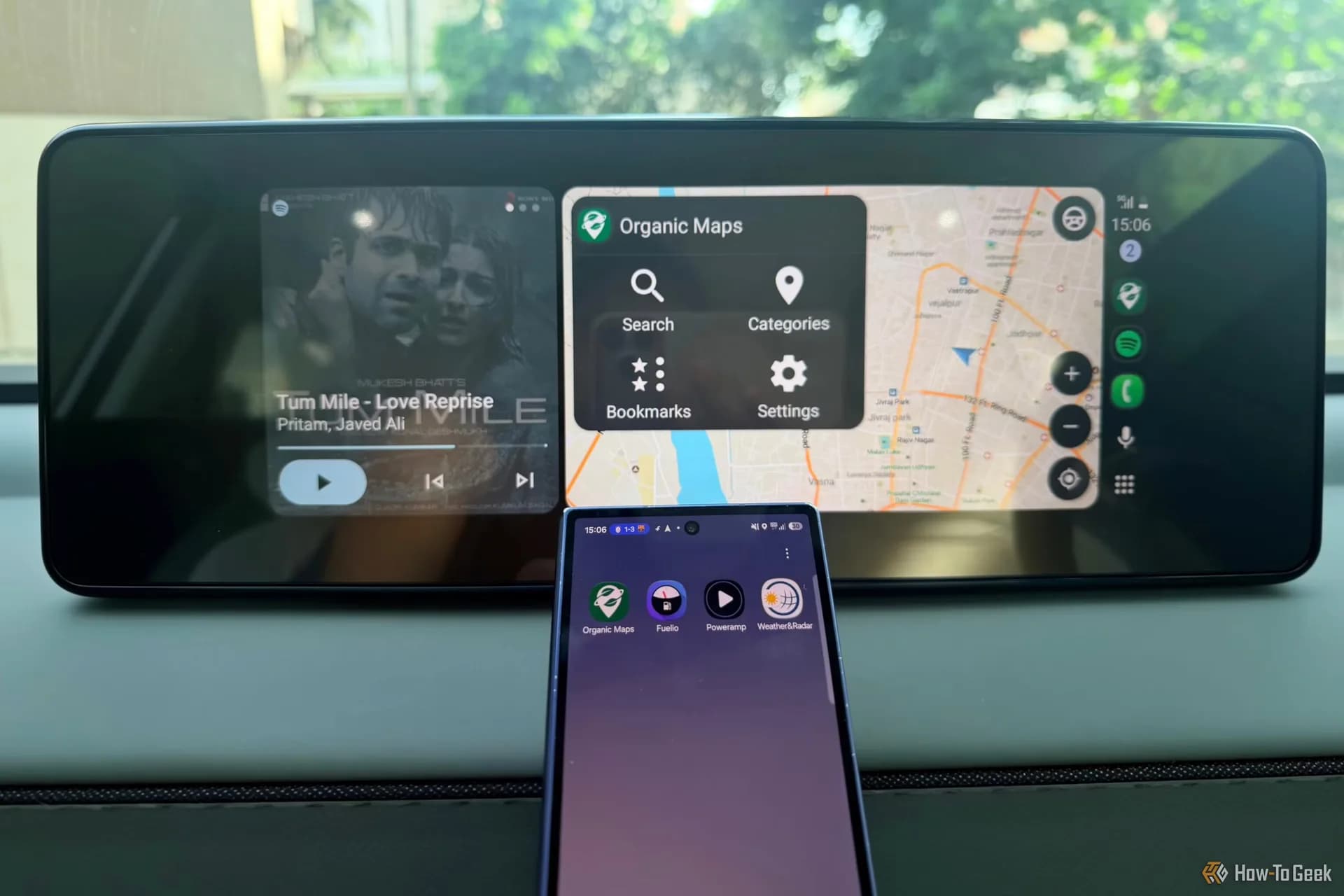
Be the first to comment
Join the argument. No password, just your email or a passkey.