Skip to content
Trending

Tech news, reviews and launches, reported straight.

Laptops & PCs1 min read

How to force an app to use the discrete GPU in Windows 11

A two-minute Windows 11 setting overrides iGPU fallback—and fixes games, renderers, and white screens. But only if your laptop is plugged in and set to Best Performance.

By Clock Speed

The Computing Desk · (3 hours ago)

Reported fromoutlet, credited1
Photo via XDA Developers

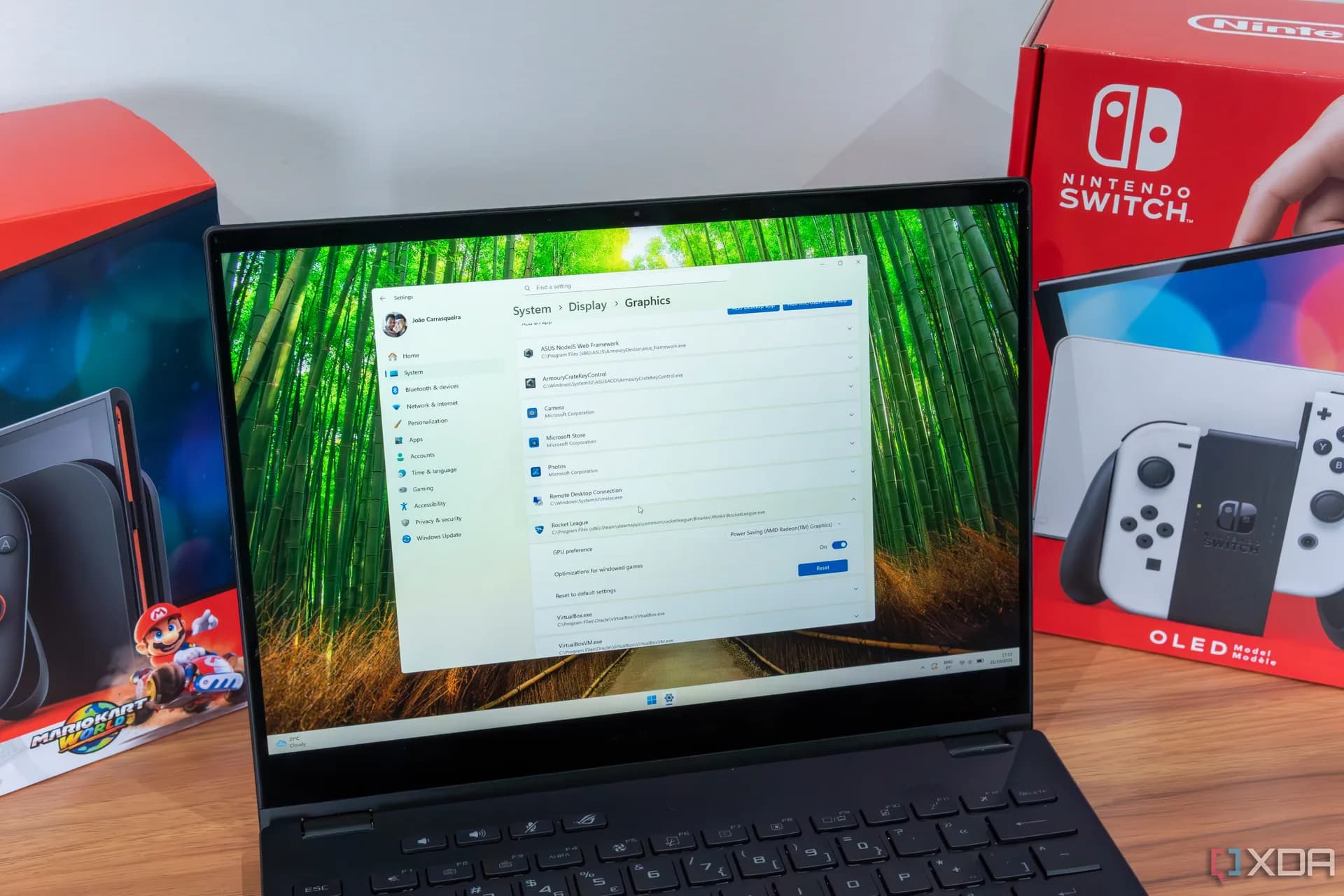
Windows 11’s built-in GPU preference setting — buried in Settings > System > Display > Graphics, is now the authoritative way to force apps to run on a discrete GPU, overriding NVIDIA Control Panel and AMD Adrenalin defaults. It works on any Windows 11 device with both integrated and dedicated graphics, including RTX 40-series laptops, and takes under two minutes to configure per app.

But it only sticks if power settings allow it: Battery Saver mode or non-Best Performance plans will silently revert apps back to the iGPU, even mid-game or mid-render. Plug in. Switch power plans. Then set it.

That’s the full workflow, confirmed by XDA Developers’ testing published Friday morning. The setting doesn’t change display output routing, the screen still runs through the iGPU for efficiency, but shifts rendering work to the dGPU where it belongs. And yes, Steam and Epic launchers often ignore it. Apply the preference directly to the game’s.exe file instead.
Most users won’t need this at all. Windows 11 handles GPU selection automatically in the vast majority of cases. But when an app crashes, renders blank (like that white-screen game XDA cited), or stutters despite hardware that should handle it, this is the fix. It’s not new, Microsoft added it in late 2022, but it’s newly relevant as more Windows 11 laptops ship with dual-GPU configurations and more users hit edge cases where auto-selection fails.

No driver updates required. No registry edits. Just Settings, Graphics, and one toggle per app. Microsoft hasn’t announced changes to the feature, but its quiet reliability makes it the first thing to check before blaming hardware, drivers, or the app itself.

Reported from

How this story was made

Written by the Hitechreports desk from the reporting credited above, with facts attributed to their original publishers. We do not test devices ourselves; anything about performance, battery life or cameras comes from the outlets that did. Prices are as reported at the time of writing. Editorial policy · Report an error

What did you make of it?

Filed by The Computing Desk

Laptops, desktops, processors, graphics cards and the operating systems that run on them.

More from this desk →

Be the first to comment

Join the argument. No password, just your email or a passkey.