Windows 11 26H2 introduces no new security features. Instead, it delivers something long overdue: a single, actionable view of whether your PC is actually using the security tools Microsoft has shipped for years — and a one-click way to turn them on if they’re not. The feature, called Windows baseline protection, is live now in Insider build 26340.10013 (Experimental channel).
It checks against a published standard that bundles existing requirements: Secure Boot, virtualization-based security (VBS), Memory Integrity, and stricter driver signing. All were available before. None are new. But until now, confirming they were active meant digging across UEFI firmware menus, PowerShell commands, and scattered Windows Security pages.
Now it’s one page: Settings > Security > Security baseline. If your device fails, the page lists exactly what’s missing, and, on Home and unmanaged devices, lets you enable most items with a single action. Some fixes require firmware-level changes (like enabling Secure Boot in UEFI), and Windows walks users through those steps.
A failed baseline doesn’t mean malware is present. It means a protection is inactive, and that gap could matter. Developers and IT admins can now use the same baseline report to gate access to apps or services. Microsoft provides a hardware-backed attestation token so servers can verify the result remotely.
That opens the door for stricter enterprise policies, or tighter app-level security checks in consumer software. Alongside the baseline, Microsoft has overhauled the Settings app itself. A new top-level “Security” section consolidates Device protection, Device encryption, Virus & threat protection, and the new baseline page. Firewall settings have moved out, now under Network & internet, because Microsoft says firewall rules belong with network configuration.
But full firewall toggles remain in Windows Security. This isn’t a redesign of security architecture. It’s a redesign of access. For years, Windows security lived in at least four places: Settings, Windows Security, UEFI, and Group Policy.
Now the core controls for most users sit together, and the system can tell you, plainly, whether they’re working. The baseline itself is versioned and maintained by Microsoft. It’s not tied to Windows 11 hardware requirements: an older PC with compatible firmware can pass, while a newer one with misconfigured settings will fail.
Microsoft hasn’t said whether failing the baseline will ever block updates or features, only that it won’t prevent Windows 11 from running on unsupported hardware. The rollout starts with Insiders. General availability aligns with the 26H2 release, expected in mid-2027.
CDFiled by The Computing Desk
Laptops, desktops, processors, graphics cards and the operating systems that run on them.
More from this desk →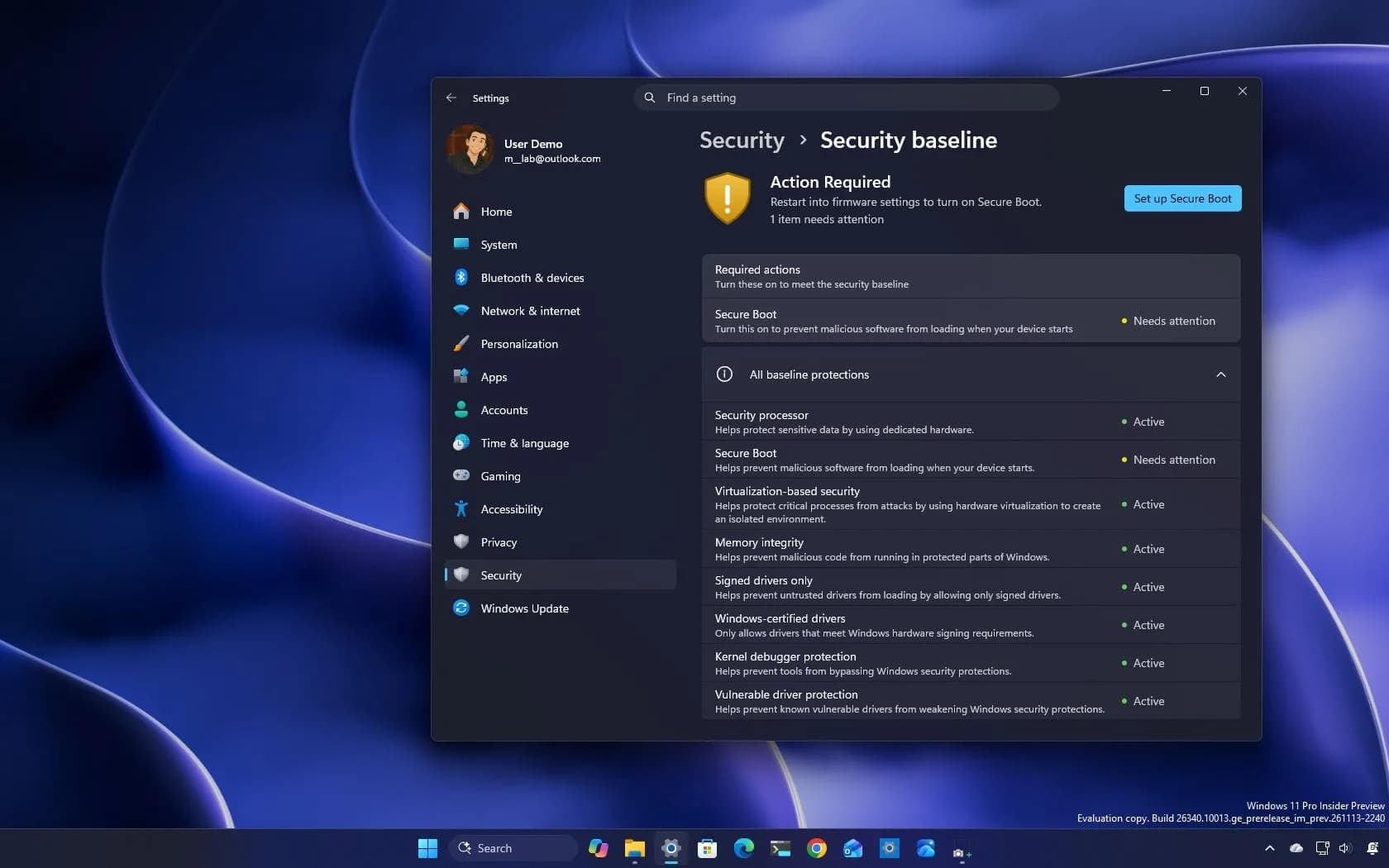
Be the first to comment
Join the argument. No password, just your email or a passkey.