Windows 11’s hidden ‘Ultimate Performance’ power plan is real — and it’s now confirmed to ship with the OS, though Microsoft keeps it buried deep. It’s not a new feature, but a long-dormant, undocumented scheme that users can unlock via Command Prompt: powercfg -duplicatescheme e9a42b02-d5df-448d-aa00-03f14749eb61. Once activated, it appears in Power Options alongside Balanced and High Performance, and it behaves very differently from both.
It forces the CPU’s minimum processor state to 100%, disables core parking entirely, and lowers the threshold for waking idle cores from ~80% to ~65% utilization. That means less latency when workloads spike. But also higher idle power draw, more heat, and no battery savings at all. It’s officially intended for high-end workstations running sustained, CPU-heavy tasks like video encoding or large-scale data processing.
Not for laptops. Not for most gamers. And definitely not for everyday use. XDA Developers tested it across four titles: Fortnite, Cyberpunk 2077, Black Myth: Wukong, and Forza Horizon 5.
Only Fortnite, a heavily CPU-bound, multiplayer title with real-time physics and network updates. Showed measurable gains: average FPS jumped from 101 to 108, and 1% lows improved. The other three, all GPU-bound single-player games, showed no statistically meaningful difference in frame rates or stuttering. That tracks with how Windows 11’s power management actually works: it doesn’t boost clocks or overclock chips.
It just removes throttling guardrails, so the benefit only shows where the CPU was previously holding itself back. On a desktop workstation with robust cooling and stable power, that can shave milliseconds off render queue starts or compilation times. On a laptop? It’ll throttle sooner, run hotter, and drain the battery faster.
With zero upside. Microsoft never advertises Ultimate Performance because it’s not a performance upgrade. It’s a trade-off: consistency over efficiency. And it’s only worth enabling if your workflow demands predictable, low-latency CPU response, not higher peak speeds.
The plan ships with every copy of Windows 11 Pro and Windows 11 Home. No update required. No subscription. Just an admin-level CMD command and a reboot.
It goes live the moment you enable it. No rollout, no delay, no regional restriction.
CDFiled by The Computing Desk
Laptops, desktops, processors, graphics cards and the operating systems that run on them.
More from this desk →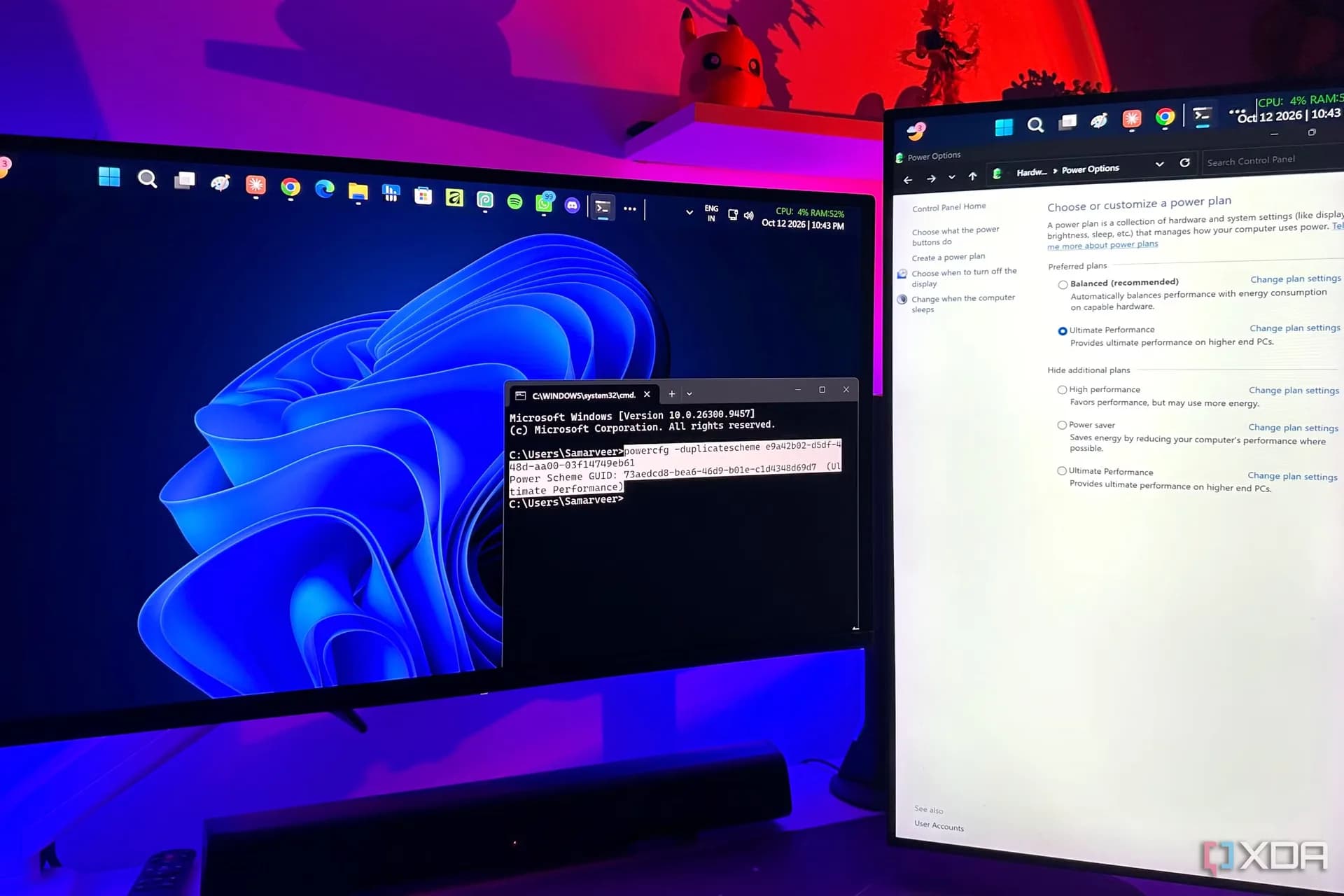

Be the first to comment
Join the argument. No password, just your email or a passkey.