Windows 11 Pro users in the US and India get new context menu controls, native speed tests, and per-app privacy toggles — starting now in preview builds, with some rolling to stable this month. Microsoft shipped eight Windows 11 preview builds in October 2026, and several features tested across them are already live for Insiders in the Dev and Experimental channels.
None require a license upgrade: all land on existing Windows 11 Pro installations (and Home, though Pro is the default for business and power users in both markets). Price remains unchanged: Windows 11 Pro costs $199.99 in the US and Rs 14,999 in India when bought standalone. It ships preloaded on most mid-to-high-end laptops from Dell, HP, Lenovo, and ASUS.
The biggest change is the right-click menu. Build 26220.9757 introduces full customization under Settings > Personalization > Context menu. You can now choose which commands appear directly, Send to, Print, Create shortcut, Copy as path, Rotate image, and whether app extensions live in a collapsible submenu or stay visible. Cut and Paste can be stacked vertically again.
Properties moves to the bottom. And yes: “Show more options” is back. Hold Shift while right-clicking to force the classic menu, no registry edits needed. That’s not just polish.
It fixes a years-long complaint: the modern menu buried essential actions behind two clicks. Now it’s configurable, not just for power users, but for anyone who prints PDFs or sends files to USB drives daily. Also shipping now: a native internet speed test in Quick Settings (build 26340.9767, Experimental channel).
No Edge, no Bing, no tab switch. Tap the network icon, pick “Test internet speed”, and get latency, download, and upload figures overlaid on your desktop. Same backend service, but finally decoupled from the browser. Privacy gets sharper too.
Starting with build 26220.9739, desktop apps, Win32, not just Store apps, now show up individually under Camera, Microphone, and Location permissions in Settings > Privacy & security. You can toggle access per app, and ungranted apps trigger a prompt on first use. Unsigned apps appear labeled “Unsigned”, a small but meaningful nudge toward verification.
The Start menu also shifts: three size options (Small, Large, Automatic), “Recent” replacing “Recommended”, and independent toggles for Pinned, Recent, and All sections. Name and profile picture can now vanish from Start entirely, a quiet win for shared or kiosk devices. And for Android users: a new Mobile Devices flyout in Quick Settings lets you check battery level, mute your phone remotely, play a ringtone to locate it, or flip Do Not Disturb, all without unlocking your PC or grabbing your handset.
These aren’t beta dreams. They’re in active preview builds today. Microsoft hasn’t announced stable rollout dates, but given the cadence of recent 26H2 updates, expect most to land in the November 2026 cumulative update, likely by 15 November for Windows 11 Pro users on automatic updates. One thing isn’t coming back: the old context menu by default.
Microsoft is betting users will prefer choice over nostalgia. So far, the tools are there. Now it’s up to you to configure them.
CDFiled by The Computing Desk
Laptops, desktops, processors, graphics cards and the operating systems that run on them.
More from this desk →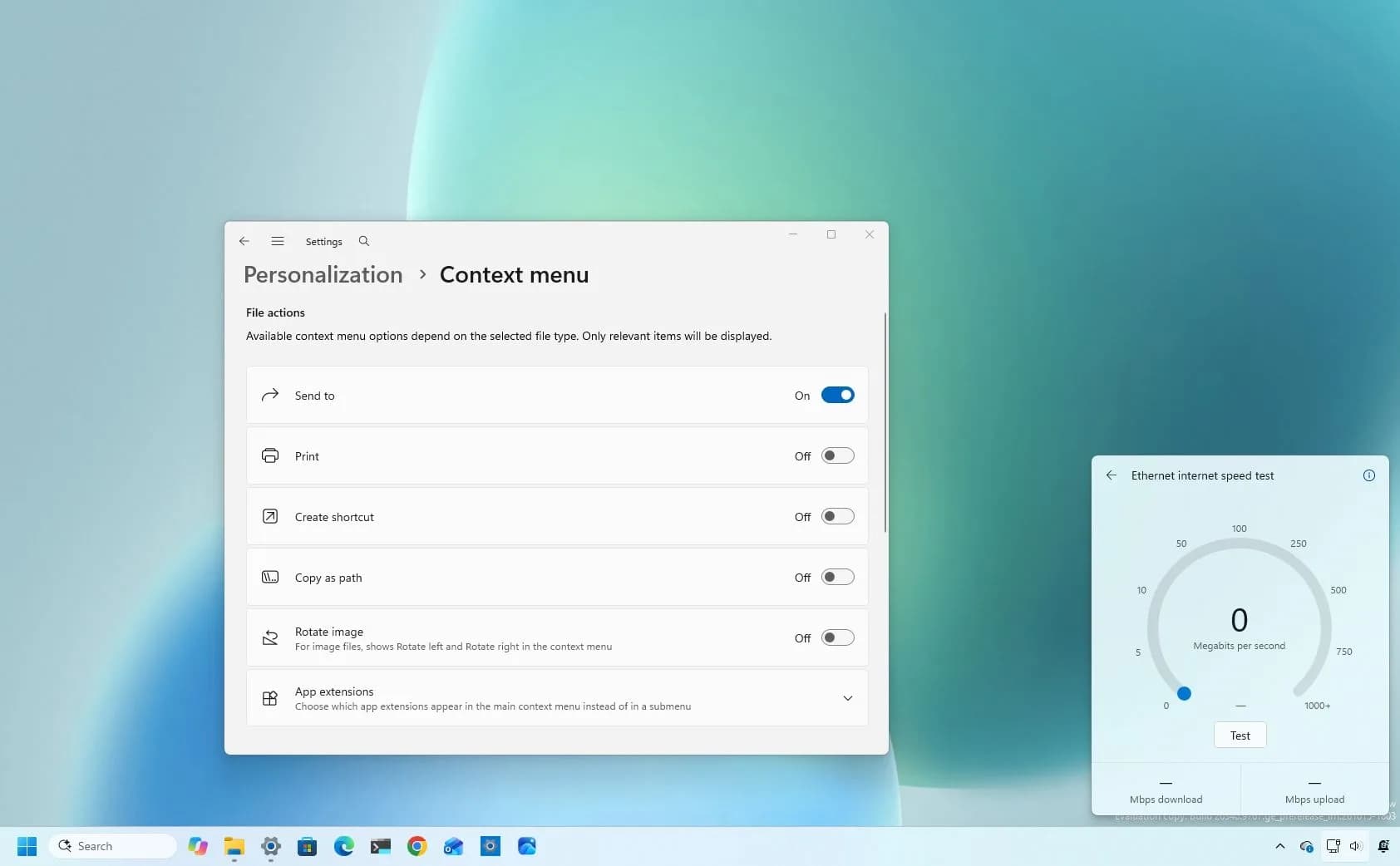

Be the first to comment
Join the argument. No password, just your email or a passkey.